
Welcome to Tri-Area Community Health
Patient Portal FAQs
Frequently Asked Questions
What is a patient portal?
- A patient portal is a secure web site which allows patients to access their medical records, including visit summaries, medications, lab results, medical history and more, via the internet. As a patient of TACH, you have the ability to manage certain information in your medical record and stay connected to your healthcare providers via secure messaging.
What if I don’t receive my registration e-mail?
- If you have not received your registration email within 24 hours of providing us with your email address, please check your junk or spam folder. If you still cannot locate the email, please contact your care center directly. You can also go to our webpage https://www.triareahealth.org/, then select patient portal, click to view your health record, then choose the cell phone option, then the system will text your cell phone with a code to access your patient portal.
What if I forget my username and password?
- You can also go to our webpage https://www.triareahealth.org/ then select patient portal, click to view your health record and then you can choose by user Credentials that will give you an option if you have forgotten your user name and password or choose to access by your cell phone. Credentials option must be utilized to reset a forgotten User name and/or password.
- If you choose the cell phone option, then the system will text your cell phone with a code to access your patient portal.
What do trackers mean?
- The system has the ability to interface with “trackers” such as Fitbit, Apple Watch, Google Fit and a variety of other health maintenance accessories.
What is a proxy?
- A proxy is an individual that you designate to assist in your medical care. For your patient portal, a proxy is an adult family member or other person you select to have the right to view and manage certain information in your portal. This individual would be called your “proxy” for purposes of your patient portal only and is different than a Legal Guardian or person who has Power of Attorney. Your proxy can only gain access to your patient portal after you and your proxy complete and sign the Patient Access to Medical Records (PHI) Through the Patient and/or Proxy Portal Form. A parent of a child ages 0 through 17 is the proxy for the child. When a patient turns 18 years old, his/her parent or legal guardian’s proxy privileges will be revoked.
What can my proxy see?
All information will be available including your problem list, allergies, medications, laboratory and radiology results, and other clinical documents.
What if I change my mind later about who can view my portal?
- A patient age 18 years or older may opt to remove proxy’s access to her/him medical information on the portal. The patient will need to complete the Revoke Proxy Access Form.
What if I have more than one child and/or also have my own TACH portal?
- You will be able to access the portals for you and your children at the same site. However, you will need a unique username and password for each portal. If you use the healow app, you will be able to access with one log-in to the medical records of each member of your family. You will also be able to access the records of any patient for whom you are a proxy.
What is the healow™ app?
The healow™ app is a mobile application that contains the same medical information as does the web-based portal. You can download it for free from your app store. The office code needed for registration for the app is CFGCA.
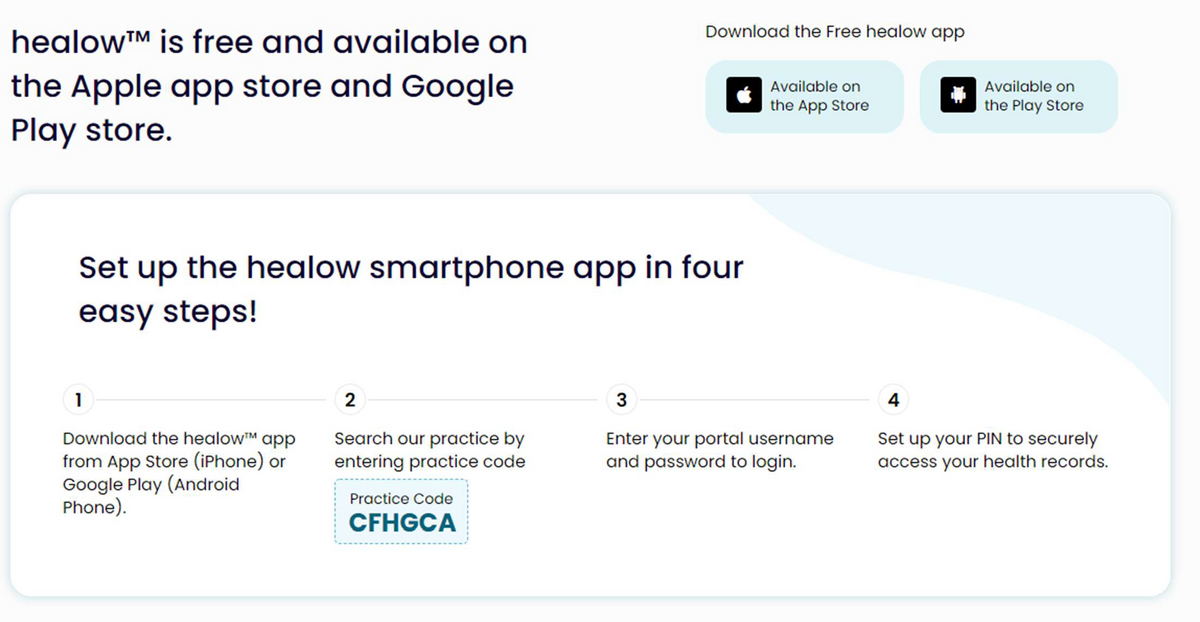
healow™ is free and available on the Apple app store and Google Play store
Set up the healow™ smartphone app in four easy steps!
- Download the healow™ app from App Store (iPhone) or Google Play (Android phone).
- Search our practice by entering practice code CFHGCA.
- Enter your portal username and password to log in.
- Set up your Pin to securely access your health records.